Out of the box, Sovereign AI answers from the model's general knowledge. Connected to your documents, repositories, and systems, it answers from your ground truth and shows you when it did.
Three ways in
- →Upload documents directly: they are ingested into the knowledge base with per-item status you can watch.
- →Sync a data connector: a configured source that pulls from an external system on a schedule, with sync status, last-synced time, and errors in the open.
- →Wire an MCP connection: a live bridge to an internal system, for data that should be queried in place rather than copied.
Connect a source
- 1Ask your admin to open Organization Settings, then Knowledge & Data.
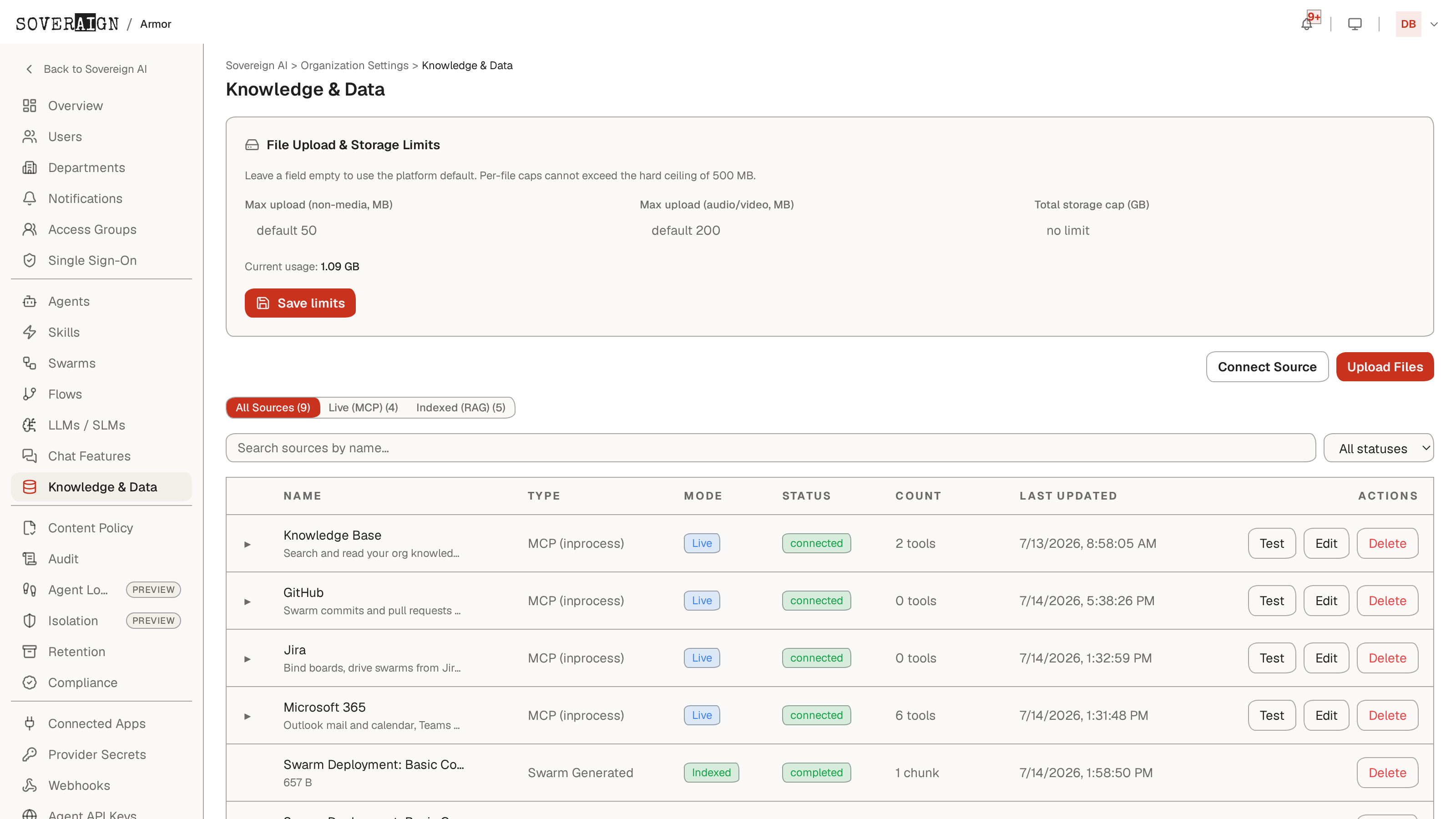
- 2Add the source: Upload Files for documents, or Connect Source for a connector or MCP bridge.
- 3Watch ingestion finish. Each source reports its mode (Live or Indexed), connection status, and item count; failures say why, not just that. Test, Edit, and Delete sit on every row.
See it working in chat
Once sources are live, chats in scope draw on them automatically, and replies that used your knowledge carry a small sources badge showing how many were consulted. When the assistant wants to search the knowledge base mid-conversation, that is a governed tool call: you see the approval card unless your admin has set a standing policy.
Credentials for connected systems are encrypted and never shown back in the UI. Your admin controls which access groups reach which sources.