What you'll build
This Flow is a scheduled, fan-out / fan-in pipeline. One trigger kicks off five parallel data collectors - one per security tool - which all feed a single security-analyst agent. The agent correlates and prioritizes the findings, a Report node assembles the deliverable, and two final steps push it to Teams and email. The finished graph looks like this.
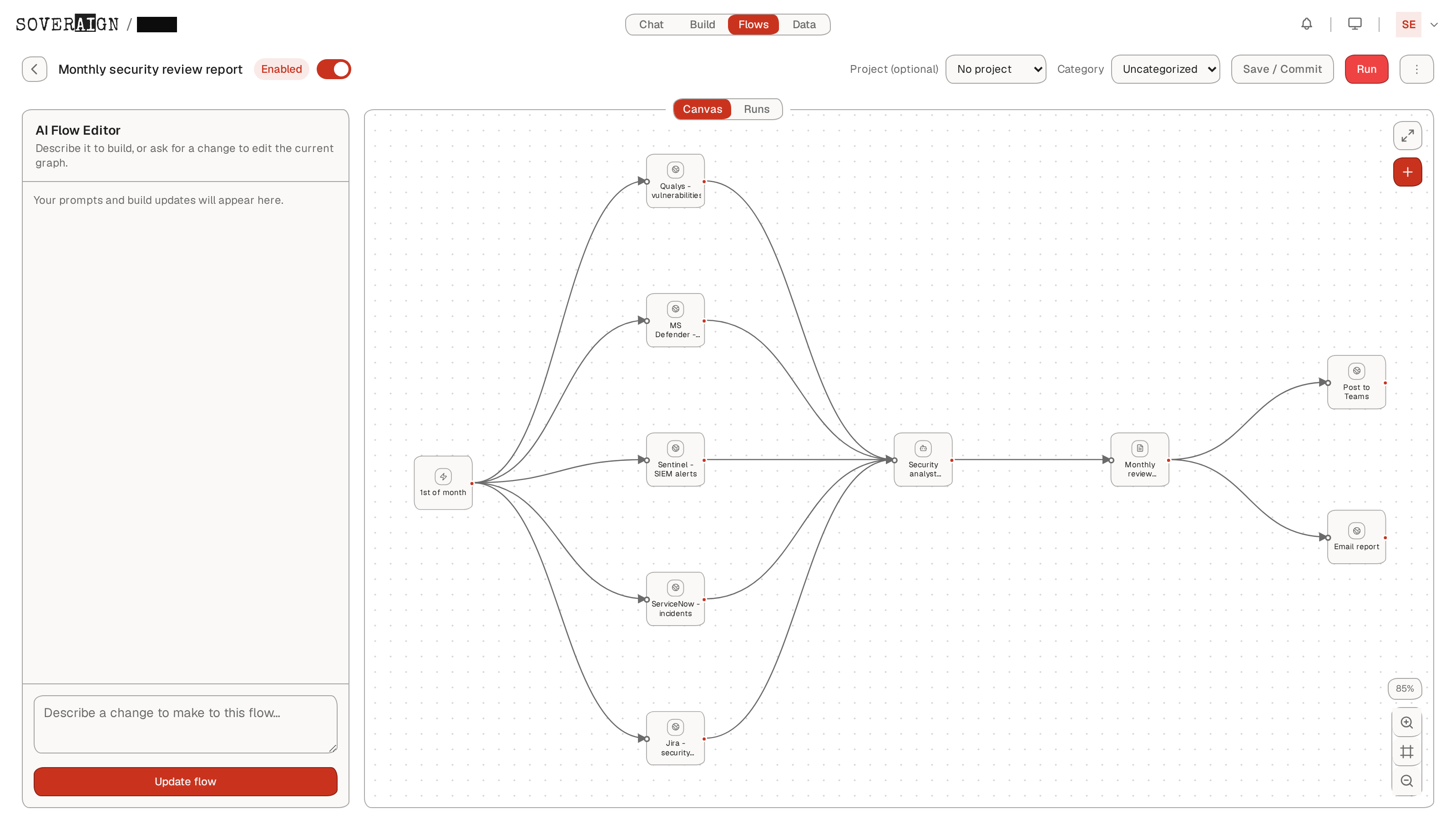
The pipeline at a glance
Trigger (1st of month, 0 6 1 * *)
   ├──▶ Qualys - vulnerabilities   (HTTP Request) ┐
   ├──▶ MS Defender - endpoints    (HTTP Request) │
   ├──▶ Sentinel - SIEM alerts     (HTTP Request) ├──▶ Security analyst
   ├──▶ ServiceNow - incidents     (HTTP Request) │      synthesis (Agent)
   └──▶ Jira - security tickets    (HTTP Request) ┘             ▼
                                                  Monthly review report (Report)
                                                        ├──▶ Post to Teams (HTTP Request)
                                                        └──▶ Email report  (HTTP Request)
The building blocks
Flows are assembled from a fixed palette of node types. This use case uses four of them. Open the palette any time with the Add nodes button on the canvas.
| Node | Role in this Flow |
|---|---|
| Trigger | Starts the run on a monthly schedule. Cron 0 6 1 * * = 06:00 on the 1st of each month. |
| HTTP Request | Calls each security tool's API with a stored credential. Used seven times: five collectors + Teams + email. |
| Agent | A self-contained security-analyst agent that correlates all five feeds and produces prioritized findings. |
| Report | Synthesizes the agent output into a single readable deliverable, stored on the run. |
Why HTTP Request for every tool? There are no dedicated Qualys, Defender, Sentinel, ServiceNow or Teams nodes. Every external integration is the generic HTTP Request node pointed at that tool's REST API, authenticated with a credential you store once. This keeps the Flow explicit about exactly which endpoint it hits and what it sends - and lets you add any tool with an API, not just a fixed catalog.
Build it step by step
- 1Create the Flow & set the schedule. From the Flows tab, click
New Flow, name it Monthly security review report, and open the Trigger node. Choose Schedule and enter0 6 1 * *so it runs at 06:00 on the 1st of every month. - 2Add the five data collectors. Drop five HTTP Request nodes and connect each to the trigger so they run in parallel. Point each at its tool's API - Qualys (vulnerabilities), Microsoft Defender (endpoint alerts), Sentinel (SIEM alerts), ServiceNow (incidents), Jira (security tickets) - using a stored credential per tool.
- 3Add the security-analyst agent. Add an Agent node - Security analyst synthesis - and connect all five collectors into it. Give it an instruction to correlate the feeds, deduplicate, score by severity/exploitability, and emit a prioritized actionables list.
- 4Assemble the report. Add a Report node - Monthly review report - downstream of the agent. It captures the synthesized deliverable and files it on the run for audit.
- 5Deliver to Teams & email. Add two more HTTP Request nodes off the report - Post to Teams (a Teams incoming webhook) and Email report (an email-send endpoint) - so the report lands in your channel and inboxes.
- 6Save & commit. Click
Save / Commit. The graph is validated on save - invalid node shapes are rejected - so a green save means the Flow is runnable.
Collecting the data
Because all five collectors are wired to the same trigger, they execute in parallel - the run is as fast as your slowest API, not the sum of all five. Each returns its slice of the security picture:
- →Qualys - open vulnerabilities and their severity / CVSS scores across scanned assets.
- →Microsoft Defender - endpoint detections and device-level alerts.
- →Microsoft Sentinel - SIEM incidents and correlated analytics-rule alerts.
- →ServiceNow - logged security incidents and their state / assignment.
- →Jira - a fifth collector pulls open security tickets, so the synthesis sees both what's detected and what's already being worked.
Synthesis & prioritized actionables
The Security analyst synthesis agent is the intelligence of the Flow. It receives all five feeds as input, then correlates them - matching a Qualys CVE to a Sentinel alert to an open ServiceNow incident - deduplicates overlapping signals, and ranks everything by severity and exploitability. Its output is a prioritized actionables list, not a raw dump: what to fix first, why, and which existing ticket or incident it maps to.
That output flows into the Monthly review report node, which files the full deliverable on the run so every month's report is retained and auditable.
Delivering to Teams & email
The report node fans out to two HTTP Request delivery nodes. Post to Teams sends the summary to a Microsoft Teams incoming webhook; Email report posts to an email-send endpoint for your distribution list.
Good to know. The built-in Microsoft 365 connector is read-only (it can search mail/Teams, not send). Outbound delivery therefore goes through the HTTP Request node to a Teams incoming webhook or an email-send endpoint, using a credential you store once in settings. Flows also raise an in-app run complete / run failed notification on every run regardless.
Run & monitor
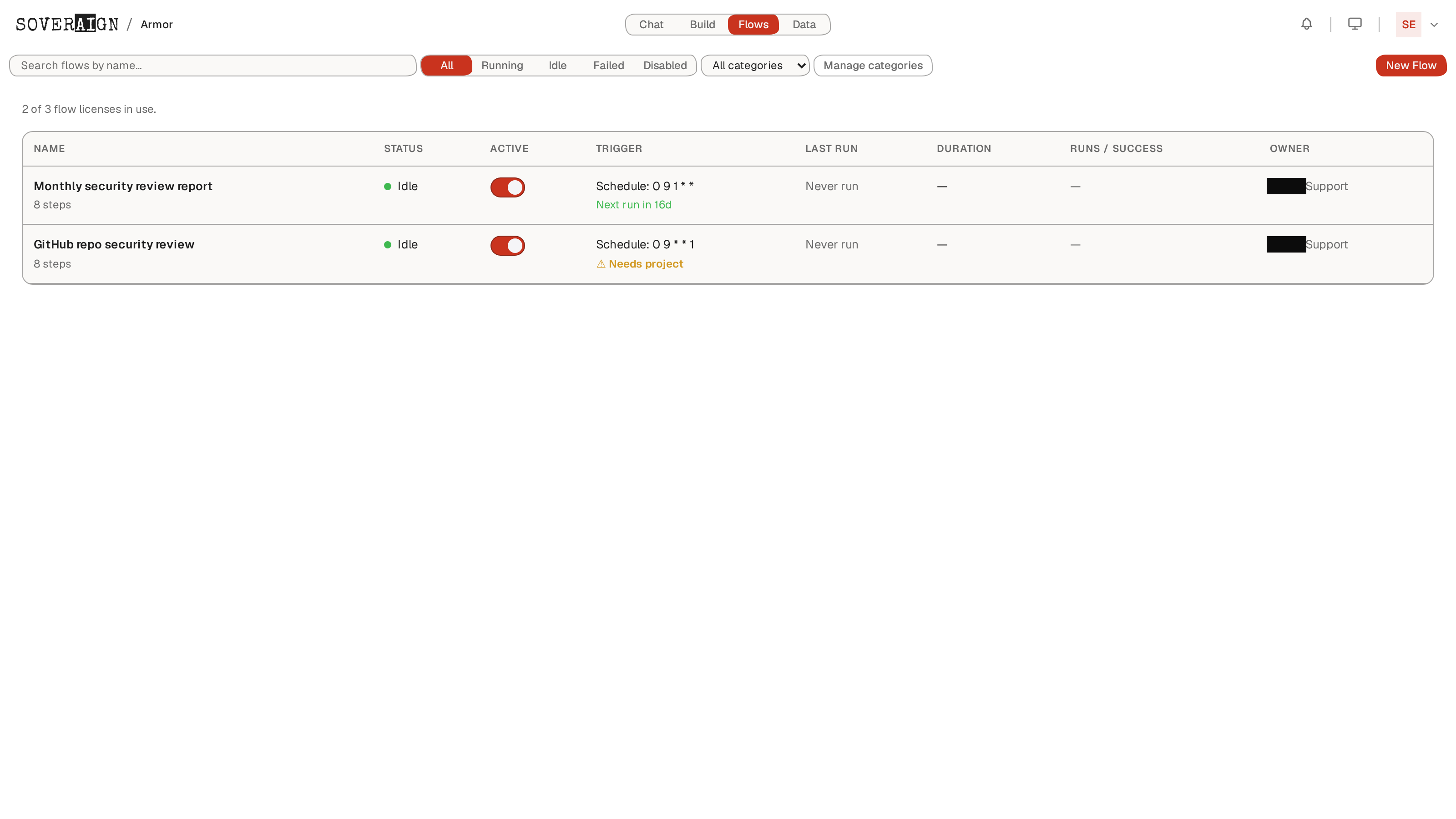
Once saved and enabled, the Flow appears in the Flows list with its schedule, next-run time, and success rate.
Open the Runs tab and expand a run for a live, step-by-step trace with per-node status, duration and cost - so you can watch all five collectors finish, then the synthesis, report and delivery.
Notes & limits
- →Node types are fixed. You compose from the palette (Trigger, Crew, Agent, Swarm, Decision, Loop, Human, Report, Set Variable, Echo, HTTP Request, GitHub). There's no bespoke Qualys / Defender / Sentinel / ServiceNow / Teams node - every integration is an HTTP Request node as shown here.
- →Parallel by design. Wiring all five collectors to the trigger runs them concurrently; the agent waits for all five before synthesizing.
- →Credentials for each tool and the Teams/email webhooks are stored once in settings and referenced by the HTTP Request nodes - never inlined into the Flow definition.
- →Requires a Build seat. Flows is a build-surface feature and is gated accordingly.